How to Label Toolbox Drawers: Map, Measure & Preview
SpartanShopper · May 7, 2026
A tidy label cannot rescue a mixed drawer. Use this sample drawer map and planning worksheet to sort your tools, test the names and measure the mounting space before ordering.
To label toolbox drawers, sort the contents first, give each drawer a clear purpose, test the names with temporary paper labels, then measure the exact mounting spot. Choose magnetic labels only where the surface attracts a magnet and the label clears the handle. This order helps you buy the words and sizes your chest actually needs.
Disclosure: SpartanShopper has a financial connection to VoltariTek and may earn a commission from purchases through links in this guide, at no extra cost to you.
Our ongoing VoltariTek code VTEK25 gives 25% off. It has no scheduled expiration; the prices in this guide are before the coupon.
1. Give each drawer a job
Work through one drawer at a time so loose tools do not become a second project across the floor. Separate items you repeatedly search for, such as metric and SAE sockets. Keep a tool with the accessories you normally use with it when that makes retrieval easier. The useful question is what you reach for together, rather than which arrangement looks most symmetrical.
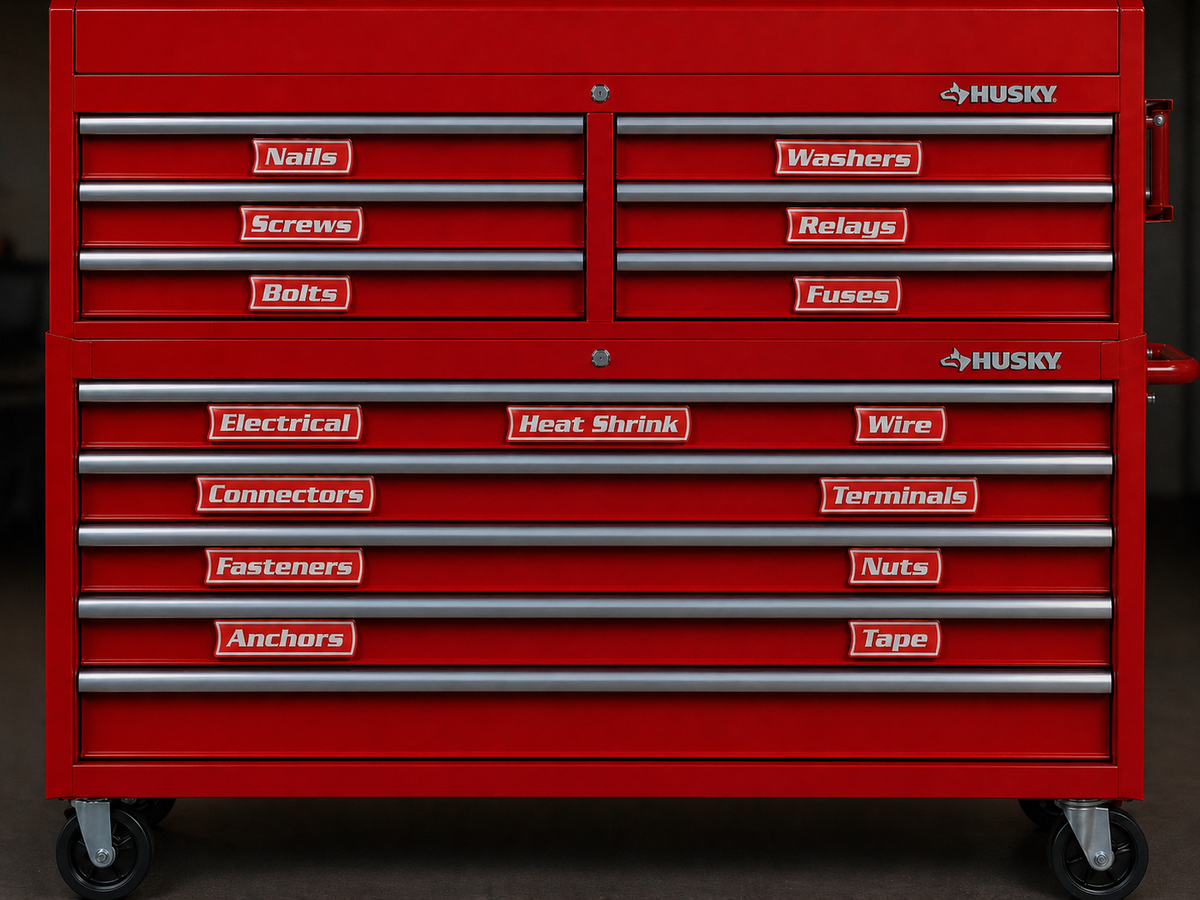
Here is an illustrative six-drawer map, not a photographed installation or a recommendation for a particular cabinet. Adapt it to your tools, available drawer depths and the toolbox manufacturer's loading instructions. A small household chest may combine categories that a mechanic keeps separate.
| Drawer | Example contents | Proposed label | Check before committing |
|---|---|---|---|
| 1 | Metric sockets and matching accessories | METRIC | Keep SAE pieces elsewhere if you split the systems |
| 2 | SAE sockets and matching accessories | SAE | Use the same sorting method as the metric drawer |
| 3 | Screwdrivers and loose driver bits | DRIVERS | Give small bits a tray or holder |
| 4 | Pliers and cutters | PLIERS | Make the frequently used pairs easy to reach |
| 5 | Tape measures, squares and marking tools | MEASURE | Keep delicate edges clear of loose tools |
| 6 | Power tools and their accessories | POWER TOOLS | Check drawer depth and rated load first |
2. Test the wording before buying labels
Put temporary paper names where you expect the finished labels to sit. Use a finish-compatible method to hold them in place; even temporary tape deserves a discreet test. Work with the layout for several normal sessions. If you keep opening the wrong drawer, change the grouping or its name while the decision is still easy to reverse.
Use one naming style throughout. For example, choose category names such as DRIVERS and PLIERS, or task names such as BRAKE TOOLS and ELECTRICAL. Avoid MISC when you can name the actual contents. If someone else uses the chest, ask them to find a few tools from the names alone. Their hesitation can reveal an abbreviation that only makes sense to you.
3. Measure the mounting spot with the drawer closed
Test a small magnet on the precise area intended for the label. A steel cabinet side does not establish whether the drawer pull, trim or face is magnetic. Stainless steel varies; aluminum, wood and plastic generally need another mounting method. Magnet attraction is a surface check, not a measurement of the finished label's holding performance.
Measure the flat width and height, then check the distance to the pull, lock, seams and adjacent drawers. Do not bridge a curved face or place a label where your fingers need to grip. Record dimensions in millimeters if that matches the label builder. A wide toolbox can still have very little usable height beneath its handles.
| Drawer / exact words | Flat area, width × height | Surface / magnet result | Handle or seam clearance |
|---|---|---|---|
| ________ / ________ | ________ mm × ________ mm | ________ / ________ | ________ mm |
| ________ / ________ | ________ mm × ________ mm | ________ / ________ | ________ mm |
| ________ / ________ | ________ mm × ________ mm | ________ / ________ | ________ mm |
4. Choose how the label will attach
A magnetic label suits a compatible steel face when you want to move categories between drawers. A magnetic card holder adds a different benefit: you can replace the wording while reusing the holder. Adhesive labels or a suitable adhesive-backed holder may suit nonmagnetic fronts, subject to the finish and adhesive instructions. See our tool-chest label comparison for the tradeoffs.
For a plastic mobile box, also check the latches, seals and stacking interfaces. A placement that looks clear on an individual box can be hidden or obstructed when the system is stacked. Our modular toolbox label guide covers that decision.
5. Preview the names and check the total
VoltariTek now checks physical fit rather than imposing a fixed character count. Its how-it-works page lists a maximum finished length of 255 mm (about 10 inches). The builder’s usable text-width allowance can be smaller for the selected design, so follow its fit indicator and displayed finished dimensions. Large labels are 34 mm tall, Medium 28.9 mm and Small 23.8 mm. Measure the actual flat mounting area and leave handles, locks and seams clear.
The first five standard Large custom labels cost $19.00 before the coupon; twelve cost $29.99. Additional quantities use marginal tiers. Use the current quote for your complete list, then check shipping after the coupon. The magnetic toolbox labels buying guide explains the tiers and ready-made alternatives. When your worksheet is ready, preview your exact drawer names in the VoltariTek builder.
6. Trial one label, then finish the chest
Clean the intended spot according to the toolbox care instructions. Try one label, close the drawer and read it from your normal standing position. Open and close the drawer normally, checking the grip and nearby moving parts. For adhesive mounting, follow the specified preparation and cure instructions before judging the result.
Once that placement works, use the same alignment on the remaining drawers. Lift magnetic labels when moving them rather than dragging trapped grit across the finish. After several work sessions, review any category that keeps overflowing or receiving unrelated tools. The label should follow a useful drawer layout as it changes.
Current ordering details to check
The catalog now separates seven stocked Classic packs from 21 additional sets printed to order. The latter include Bar, Coffee Bar, Dental Office, HVAC Van, Machine Shop, Office In/Out Board and Classroom Jobs. Many have 12 labels at a $29.99 base price; count and price vary by set. You can use the supplied words or edit them in the builder. Check the actual included names, dimensions and delivery estimate; a trade or clinical label does not establish regulatory suitability.
Open Design labels to use VoltariTek’s three-step builder: Design your sets, Add your set to the cart, then Checkout. Choose Classic, Tactical, Clinical, Hazard, Retro Garage, Minimal or Name tag, with the available font and color options. Each set shares one style, color and size. Add it to the cart before designing another set; all labels in the cart count toward the quantity tiers. Review the spelling and quantities before Shopify checkout.
Shipping checked November 11, 2026: US Standard is free on orders of $29.99 or more and $8 below that; Express is $15. Confirm the shipping charge after applying the coupon, because the published policy does not explain whether its threshold is assessed before or after discounts. Custom sets normally dispatch in 3–5 business days; Express changes transit, not printing time. Stocked packs and sets printed to order have different fulfillment paths, so check the estimate for the actual order.
Custom orders are final sale for change of mind or wording entered incorrectly by the buyer, so check every name before paying. Unused standard packs in original condition have a 30-day return window; the buyer pays return shipping. The maker’s one-year Hold Guarantee covers specified defects or failed hold on clean steel under normal use, with exclusions. It is a replacement policy, not a promise of universal surface compatibility.
Read the official shipping, returns and Hold Guarantee policy
Merchant facts checked November 11, 2026 against VoltariTek’s live builder, how-it-works page, pack catalog, bulk-order page and shipping/returns policy. The ongoing 25% coupon remains confirmed directly by its creator, with no scheduled expiration. Base prices exclude the coupon, shipping and taxes. This is researched buying guidance, not a hands-on product test.
Get Exclusive Coupon Codes
Deals and discount codes delivered to your inbox. No spam.
Get a Free Healthy Snack Box
Gluten-free, sugar-free, better-for-you snacks. No purchase required.
Claim My Free BoxSponsored offer. No purchase necessary.
Related Coupons
SwitchBot
20% Off
SwitchBot — 20% Off Sitewide with Code
Save 20% sitewide at SwitchBot on smart-home devices. Visit the page for the code.
Expires: Oct 29, 2027, 5:00 PM PDT
Check that the discount applies to your items before paying.
Check offer at retailer →